移植裁剪 srs 到 ARMv64 系统设备
SRS 版本
srs 源码选择较新的 stable 版本:v5.0-r3
代码拉取
$ git clone --branch v5.0-r3 https://github.com/ossrs/srs.git
编译
已知设备系统:ARMv8 指令集架构的 Debian,此次测试选择在 Debian 系统下部署 srs 服务进行测试。
使用 docker 进行编译,首先保证开发机上有 docker 服务,编译命令会自行拉取 aarch64 专用编译镜像并编译:
$ cd srs/trunk
$ docker run -it --rm -v `pwd`:/srs -w /srs ossrs/srs:aarch64 \
    bash -c "./configure --srt=off --rtc=off --ffmpeg-fit=off --static=on \
        --sanitizer=off --sanitizer-static=off --sanitizer-log=off && make -j4"


# 查看 srs 二进制文件
$ ls -sh objs/srs
测试环境
基于当前测试条件,此次测试选择将 srs 服务部署在 Debian 系统的小盒子中进行测试。
Debian 系统小盒子性能如下:
- CPU:4 核 4 线程,主频 1.5GHz
- Mem:2GB
- Disk:8GB
观众端:
Mac 下 Shell 脚本启动 10 路 ffplay 进行播放,启动命令:
bash repeat_command.sh "ffplay https://ossrs.com:8088/live/livestream.flv" 10
repeat_command.sh 脚本:
#!/bin/bash

if [ $# -lt 2 ]; then
    echo "Usage: $0 <command> <times>"
    exit 1
fi

# 获取参数
command=$1
times=$2

# 检查 times 是否是数字
if ! [[ $times =~ ^[0-9]+$ ]]; then
    echo "Error: <times> must be a positive integer."
    exit 1
fi

# 循环执行命令
for ((i=1; i<=times; i++)); do
    echo "Executing command '$command' in the background: iteration $i"
    eval "$command &"
done

echo "All commands have been executed in the background."
SRS 配置
使用了自签名证书 ossrs.com
listen              1935;
max_connections     1000;
daemon              off;
srs_log_tank        console;

http_api {
    enabled         on;
    listen          1985;
}

http_server {
    enabled         on;
    listen          8080;
    dir             ./objs/nginx/html;

    https {
        enabled on;
        listen 8088;
        key ./ossrs.key;
        cert ./ossrs.crt;
    }
}
vhost __defaultVhost__ {
    http_remux {
        enabled     on;
        mount       [vhost]/[app]/[stream].flv;
    }
    ingest livestream {
        enabled      on;
        input {
            type    stream;
        url     http://100.100.34.14:8080/live/livestream.flv;
        }
        ffmpeg      ./objs/ffmpeg/bin/ffmpeg;
        engine {
            enabled          off;
            output          rtmp://0.0.0.0:[port]/live/livestream?vhost=[vhost];
        }
    }
}
测试结果
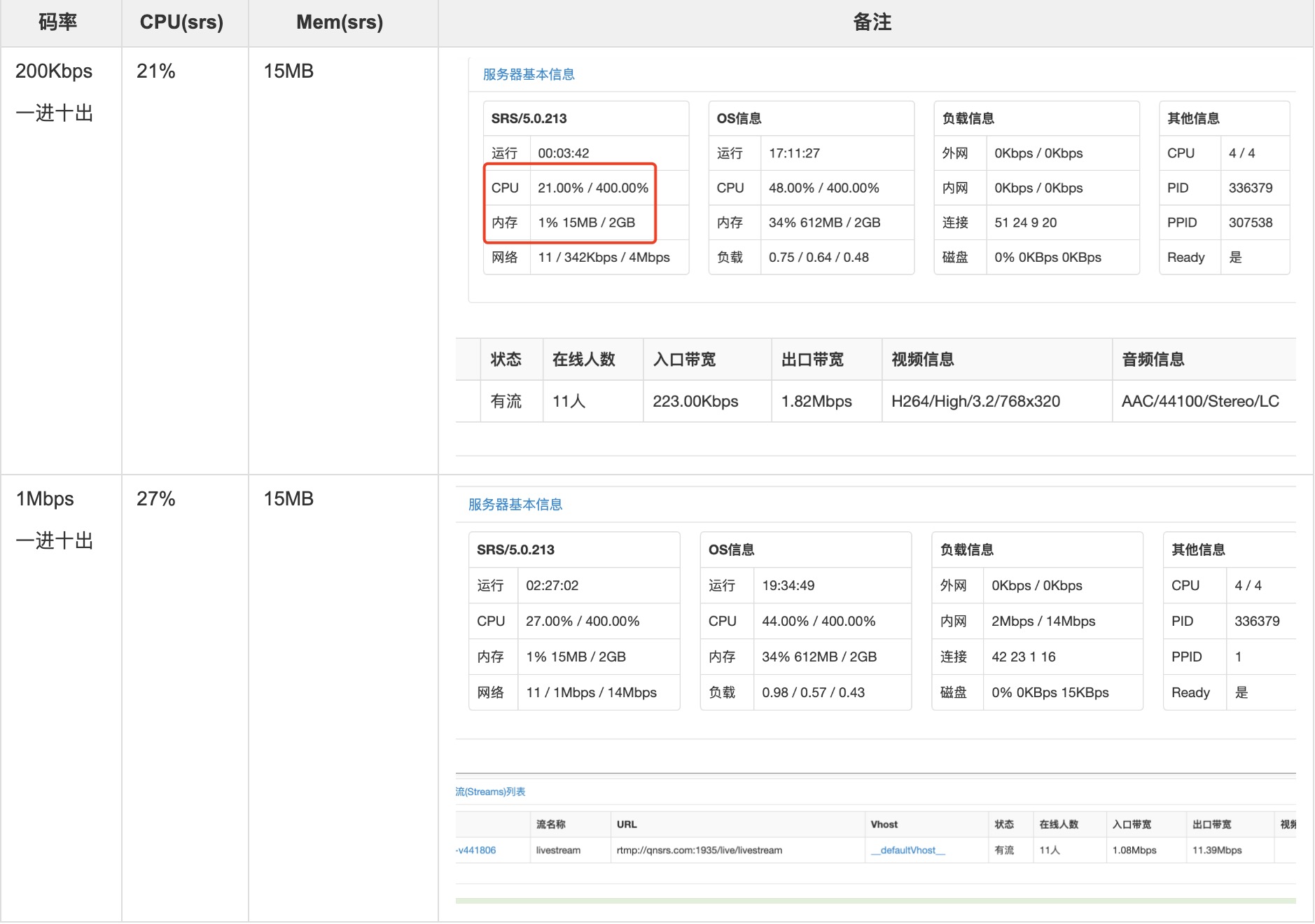
测试条件有限,目前仅测试了如下两种场景和数据,仅供参考。
测试场景:为该 SRS 注入一路 stream 做为源,然后远端从该 SRS 通过 HTTPS-FLV 拉取十路该流。
SRS 支持SNI和多证书
目前 srs 仅支持单个 HTTPS Server 的部署,需要自行扩展支持 SNI 的读取、选择指定证书下发的实现,TLS 封装代码在 SrsHttpxConn 类中。
版权声明: 如无特别声明,本文版权归 Mr Chen 所有,转载请注明本文链接。
(采用 CC BY-NC-SA 4.0 许可协议进行授权)
本文标题:《 移植裁剪 srs 到 ARMv64 系统设备 》
本文链接:https://gbcpp.github.io/notes/srs-on-arm.html
本文最后一次更新为 天前,文章中的某些内容可能已过时!

技术工作者