webtransport-go 在直播场景下的优化
背景
公司后台代码以 golang 为主,同事已经选择使用 webtransport-go 的开源方案灰度上线,虽然短期内就要接客户,使用自研的私有传输协议已经完全来不及,当下只能尽量优化 webtransport-go 这个方案,首先尽量在首开上进行优化,卡顿率相关的指标如果能与 tcp 持平甚至更好的话,就不在该方案中继续投入了,转为基于 c++ 的私有协议方案。
本人经历 2024年 11月变动以后,刚来公司不久,周边同事基本都以 golang 语言开发为主,且基本没有协议的优化经验,只能选择开源项目进行优化, B本人进入公司的时机也不好,该项目已经选定该方案,并且开始上线进行灰度测试,无法推翻重来。 且对比 Tcp 来看,webtransport-go 带来的性能消耗是 tcp 的 5 倍以上。
为什么不直接使用 quic-go
因为 quic 虽然也是可靠传输,但是 quic 暂不支持通过 Url 来携带业务测参数,如:vhost、token 等的。
初始化
代码下载
git clone git@github.com:quic-go/webtransport-go.git
拉取相关依赖仓库代码:
# 进入代码目录
cd webtransport-go

# 通过 build 触发代码拉取
go build webtransport_test.go
Golang 默认将代码存放在$GOPATH目录下,我的GOPATH环境变量配置为 /Users/eddie/develop/go,那么拉取的依赖仓库 quic-go 的存放目录就是 /Users/eddie/develop/go/pkg/mod/github.com/quic-go@v0.42.0-mod.1,为了方便在 VSCode 中查看代码,在 VSCode 的 WorkSpace 空白处通过右键选择:Add Folder to WorkSpace,选择上述目录,即可一起查看 quic-go 相关的代码,如下:
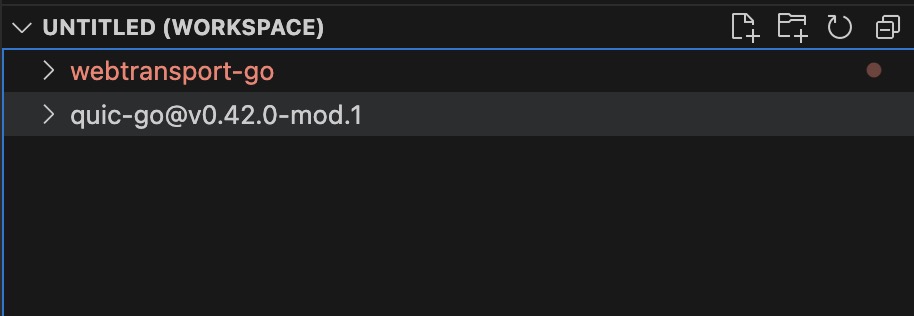
Quic-go
Quic-go 作为 webtransport-go 的依赖仓库,提供 quic 的基础传输能力,但是其提供的传输配置能力非常有限,特别是作为发送端时,一些基础的 CWnd、Burst、Ack 等参数均不支持配置,接口文件为:
/Users/eddie/develop/go/pkg/mod/github.com/quic-go@v0.42.0-mod.1/interface.go
quic-go 内部相关参数主要位于:
/Users/eddie/develop/go/pkg/mod/github.com/quic-go@v0.42.0-mod.1/internal/congestion/pacer.go
/Users/eddie/develop/go/pkg/mod/github.com/quic-go@v0.42.0-mod.1/internal/protocol/protocol.go
/Users/eddie/develop/go/pkg/mod/github.com/quic-go@v0.42.0-mod.1/internal/protocol/params.go
优化项
- 初始化发送包数:
文件:/Users/eddie/develop/go/pkg/mod/github.com/quic-go@v0.42.0-mod.1/internal/congestion/pacer.go 中指定
const maxBurstSizePackets = 10,在直播场景,I 帧切片后(1200Bytes/pkt)基本都会超过 10 片,建议配置为 20~30,具体视业务场景中首帧的切换大小,但也不宜过高,控制在 30 以内。
该配置项生效后对秒开的影响较小,属于毫秒级别,原来可能受 pacer 控制在几个 timerGraulariry 中将一个关键帧发送完,该配置的理想效果是减少这几个 timerGraulariry 的延迟。
- 握手超时时间: 应用层建议也是用 2 秒的配置。
// Default
const DefaultHandshakeIdleTimeout = 5 * time.Second
// 建议修改为 2 或者 3 秒,业务测可以快速重连,减少等待时间
const DefaultHandshakeIdleTimeout = 2 * time.Second
- 定时器精度
最好是从系统中获取自己的定时器精度(一般是4ms),不建议使用 1 ms 这种精度,过于高频,无效的 cpu 消耗。
// Default
const TimerGranularity = time.Millisecond
// 建议值:动态获取系统定时器精度,或者 hardcode 为 4ms 或者 10ms
const TimerGranularity = 4 * time.Millisecond
- 转发模式
目前业务集成方在回源时,虽然传输协议使用的是流式传输,但是边缘节点在接收到分片数据后并不会立即进行转发,而是在组装成一个完整的帧以后再一次性进行发送,这样做是为了内部各种封装格式的转换,但是也存在明显的弊端,即在没有收到完整的关键帧以前,不会向 Player 发送任何数据,被回源的关键帧阻塞,间接的增加了首开的延迟。
可优化选项:比如回源的协议与 Player 请求的协议相同,即均为 HTTP-FLV,那么便不再需要进行完整帧的转封装,而直接进行分片的透明转发,同时边缘节点也异步的 cache 分片数据进行组帧操作,转封装分发给其它请求的协议。
FAQ
Webtransport 是否是整帧的收发?
不是,websocket 在发送大的数据帧时,会通过 FIN 标记位是否为 1 标记为该 Frame 是否结束,而 WebTransport 中是基于流的传输,需要应用层自行组装完整的数据帧。 ref link
A stream is a sequence of bytes that is reliably delivered to the receiving application in the same order as it was transmitted by the sender. Streams can be of arbitrary length, and therefore cannot always be buffered entirely in memory. WebTransport protocols and APIs are expected to provide partial stream data to the application before the stream has been entirely received.
BBR sender 配置 startup 的较大带宽,但是 max burst send packets number 却较小,能将关键帧的几个切片一次性发送出去吗?
/Users/eddie/develop/go/pkg/mod/github.com/quic-go@v0.42.0-mod.1/internal/congestion/pacer.go
        p := &pacer{
                maxDatagramSize: initialMaxDatagramSize,
                adjustedBandwidth: func() uint64 {
                        // Bandwidth is in bits/s. We need the value in bytes/s.
                        bw := uint64(getBandwidth() / BytesPerSecond)
                        // Use a slightly higher value than the actual measured bandwidth.
                        // RTT variations then won't result in under-utilization of the congestion window.
                        // Ultimately, this will result in sending packets as acknowledgments are received rather than when timers fire,
                        // provided the congestion window is fully utilized and acknowledgments arrive at regular intervals.
                        return bw * 5 / 4
                },
        }
        p.budgetAtLastSent = p.maxBurstSize()
        return p
}
而在初始化时,由于没有 smoothedRTT 的有效值,所以初始化为 infBandwidth (UINT64_MAX),
/Users/eddie/develop/go/pkg/mod/github.com/quic-go@v0.42.0-mod.1/internal/congestion/bbr_sender.go
func (b *bbrSender) bandwidthEstimate() Bandwidth {
        srtt := b.rttStats.SmoothedRTT()
        if srtt == 0 {
                // If we haven't measured an rtt, the bandwidth estimate is unknown.
                return infBandwidth
        }
        bw := b.maxBandwidth.GetBest()
        if bw == 0 {
                return infBandwidth
        }
        return bw
}
虽然初始化的 bandwidth 比较大,但是 pacer 在发送数据时依然会受限于 maxBurstSizePackets 的配置,如下:
func (p *pacer) maxBurstSize() protocol.ByteCount {
        return utils.Max(
                protocol.ByteCount(uint64((protocol.MinPacingDelay+protocol.TimerGranularity).Nanoseconds())*p.adjustedBandwidth())/1e9,
                maxBurstSizePackets*p.maxDatagramSize,
        )
}
所以建议将 maxBurstSizePackets 值配置为 20 ~ 30 之间,根据业务场景,尽量让首帧(I Frame)的所有切片能够一次性发送出去,但是也不宜过高,避免数据突发导致网络拥塞丢包。
版权声明: 如无特别声明,本文版权归 Mr Chen 所有,转载请注明本文链接。
(采用 CC BY-NC-SA 4.0 许可协议进行授权)
本文标题:《 webtransport-go 在直播场景下的优化 》
本文链接:https://gbcpp.github.io/protocol/webtransport-go-optimze-for-livestream.html
本文最后一次更新为 天前,文章中的某些内容可能已过时!

技术工作者